AI is now part of how most online stores run. In Cloudinary’s 2026 survey of over 500 retailers, 84% said AI is part of their everyday workflow. Many owners use it to write product descriptions, reply to customers, check stock, and work out why sales changed.
Sounds easy, right? Well, there’s more to it than that.
AI is only as useful as the question you ask. Type “write a description for my socks” into ChatGPT or Claude and you’ll get a generic answer. The tool can’t see your store, so it guesses what you leave out.
A better prompt fixes much (not all) of that. In this article, we’ll give you a five-step data prep checklist to guarantee better output, 10 ecommerce prompts you can swipe and use today, and a look at what real brands are prompting AI in their day-to-day.
Key Takeaways
- What ecommerce prompts are: They’re the questions and instructions you give an AI tool like ChatGPT, Claude, or Moby AI to help you complete tasks related to running your store. Tasks can include writing product copy, drafting a support reply, checking your margins, or explaining why a number changed.
- How to get better answers: Name the metric, set a time frame, and ask for a breakdown, like ROAS by channel for the last two 30-day periods. Start with what changed, then ask why and what to try next.
- Where Triple Whale fits: Over 90 days, 69% of the 1,600+ Triple Whale brands that used Moby AI asked about ad performance, but only 4% asked about inventory. Moby AI reads your store data directly so that you can ask about either one without exports.
What are AI prompts in ecommerce?
An AI prompt is an input you give a generative AI tool, like ChatGPT or Claude, to get a response tailored to your needs. It can be a quick question, a single task, or a longer set of instructions with an attached spreadsheet.
An ecommerce prompt is the same idea, just aimed at your store. It might be a question like “Which ad channel got less efficient last month?” or a task like “Write three subject lines for our Black Friday sale.”
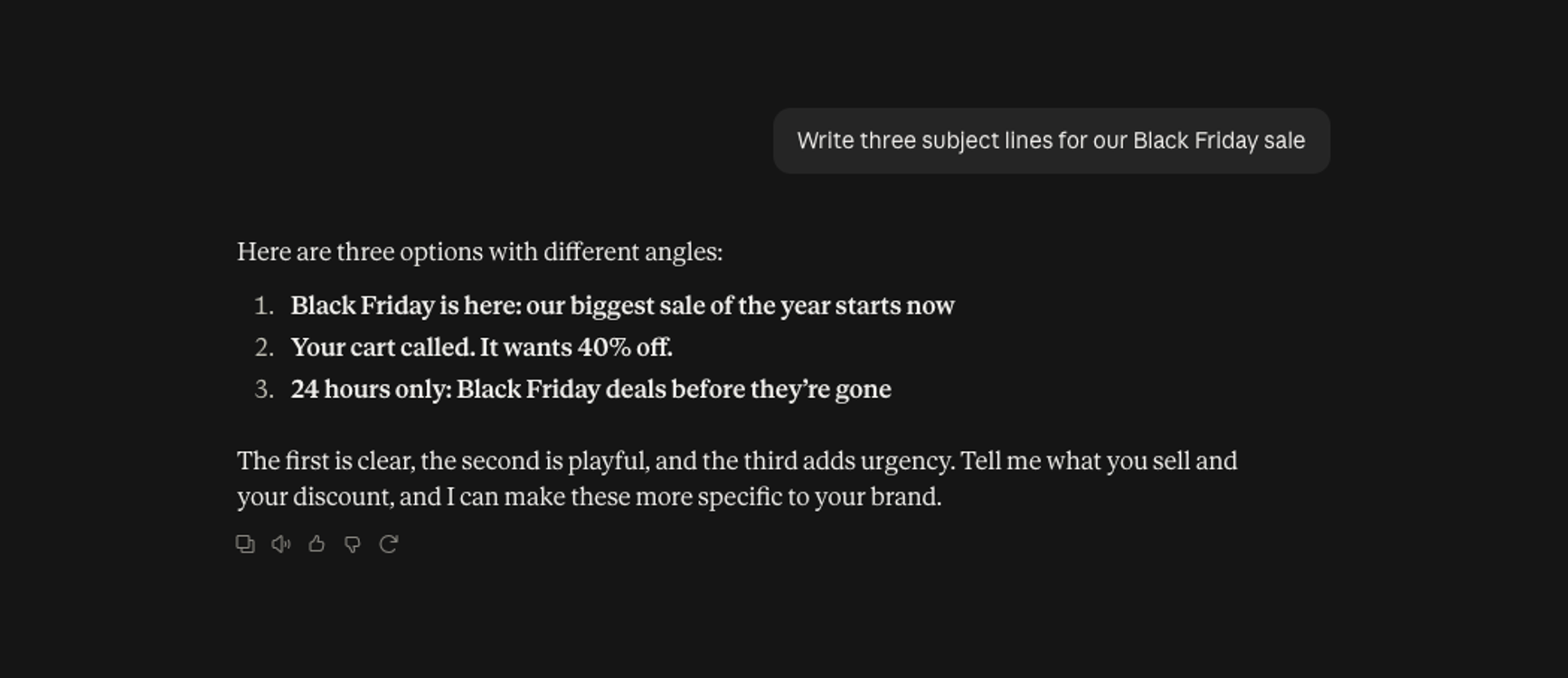
Most ecommerce prompts do one of three jobs:
- Create: Product descriptions, emails, ad ideas, and support replies
- Analyze: Margins, inventory, customer segments, and ad performance
- Diagnose: Why a number moved and what to do about it
The more specific you are in the prompt, the more useful the answer you’ll get. “How are my ads doing?” usually gets you a pep talk. A prompt like “Compare ROAS by channel for the last two 30-day periods and show your math” gets you a table you can actually check and act on.
6 benefits of using AI prompts for ecommerce
Running an ecommerce business means juggling sales, monitoring inventory, reviewing ad performance, and understanding customer behavior. Here’s how ecommerce prompts can help you cut through the noise and find the insights you need faster.
1. Spend less time analyzing data
Nobody wants to spend half their Monday morning pulling reports and sifting through spreadsheets. But when you’re tracking sales and inventory across multiple platforms, reporting can easily eat up a good chunk of your week.
With the right AI prompt, you can analyze that data in minutes. You can ask it to compare this month’s sales against last month’s, calculate changes in ROAS, or identify your best-performing products. Save the prompts you use most often, and you’ll have a head start the next time reporting rolls around.
Want more ways to move quickly? Our Speed Playbook shares strategies brands use to get results faster.
2. Make decisions with more confidence
It’s one thing to know that revenue dropped 15% last month, but another to understand what caused the decline. AI prompts can help you dig into the numbers and identify patterns worth investigating. You can also ask AI to show you its calculations and how it reached a conclusion.
3. Keep your team on the same page
Revenue can sound straightforward until two people pull different numbers for the same month. One might look at gross revenue, while another accounts for discounts and returns.
Using a shared AI prompt reduces the confusion. You can specify exactly which metrics to calculate, how to define them, and what data to use. As long as everyone is working from the same data source, it’s easier to keep reporting consistent.
4. Catch operational issues before they become problems
Running out of a popular product can mean missed sales, frustrated customers, and a scramble to restock. Instead of manually checking inventory levels, use an AI prompt to flag products that are selling out quickly or approaching low stock. You can even factor in recent sales trends to estimate how long your current inventory might last.
5. Spot opportunities to recover lost sales
Not every missed sale is easy to spot. A product may get hundreds of visits but very few purchases. Or you may be spending money retargeting customers who’ve already converted.
AI prompts can help surface patterns in your data so you can decide what deserves a closer look, whether that’s a product page with low conversion or an audience that’s seeing too many ads.
Not sure where to look first? Our Confidence Playbook shows you how to spot opportunities and act on them with confidence.
6. Better understand your customers
Use a prompt to identify products with unusually high return rates, compare repeat purchase behavior across customer segments, or analyze common complaints in customer reviews.If one product keeps getting returned, your size guide may need work.
How to write ecommerce prompts that work
AI tools like ChatGPT and Claude work with whatever you give them. If you leave out the date range, they will pick one automatically.
The details you include in your prompt shape the answer you get.
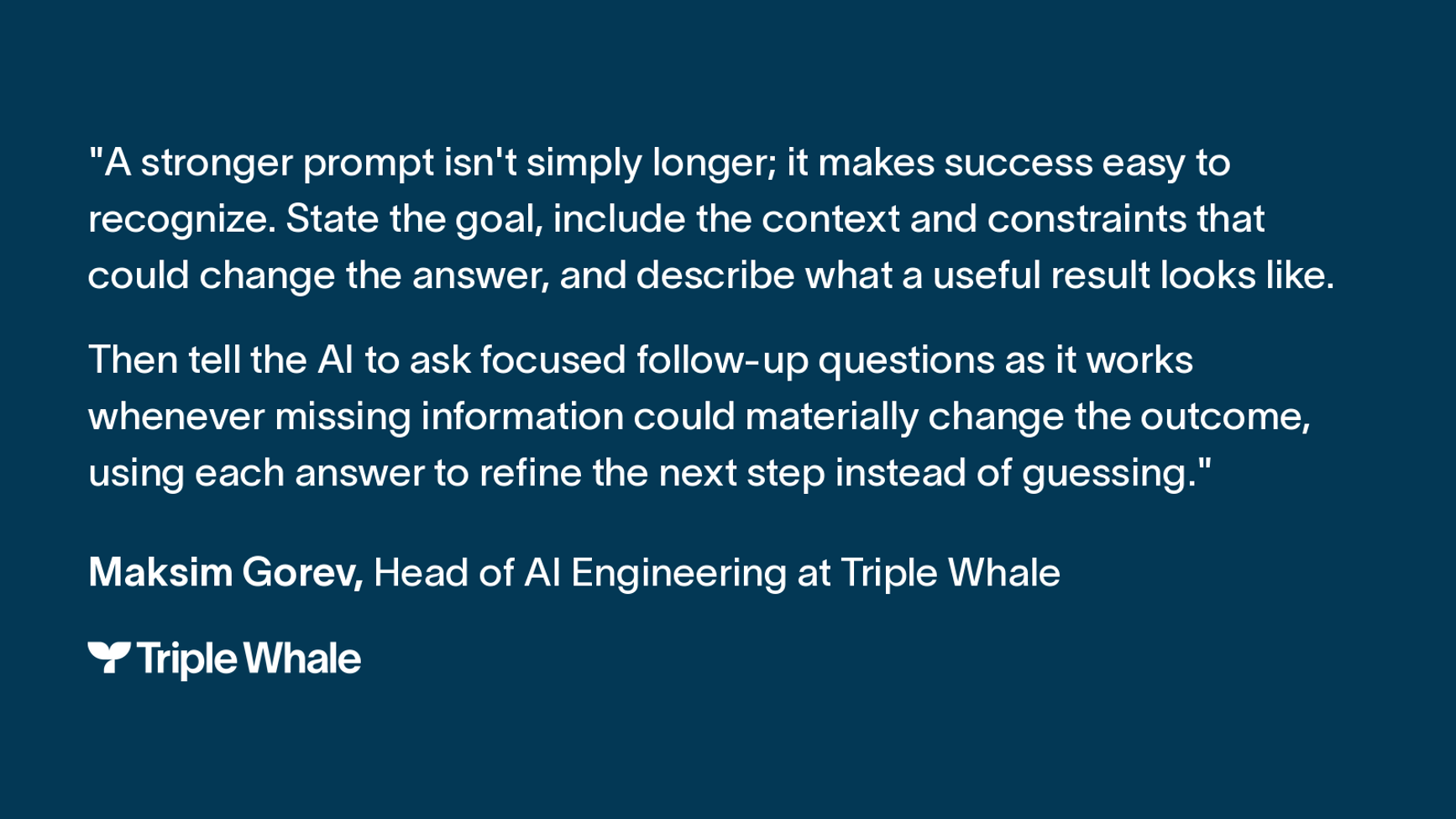
Below are six parts of a strong ecommerce prompt, the five gaps that weaken one, and how to follow up when the first answer isn’t quite right.
The 6 parts of a strong ecommerce prompt
The more context you feed an ecommerce prompt, the better the answer you’ll get without constant follow-up.
Here’s what you should include:
| Part | What to include | Example |
|---|---|---|
| 1. Role | Tell the AI who to be, like a media buyer, a copywriter, or a support lead. It changes the tone and the kind of advice you get. | “You are a media buyer for an online store that sells merino wool hiking socks.” |
| 2. Context | Say what you sell, who buys it, and what you’re trying to figure out. Mention anything that changed recently, like a new offer or a price increase. | “We sell mostly to frequent hikers in the US. We raised prices 8% on September 10 and launched a free shipping offer on September 20. Sales fell in September, but Meta says our ROAS held steady.” |
| 3. Data | Paste or attach the export you want to use. | “Use the attached export of orders and ad spend by channel for August 1 to September 30.” |
| 4. Task | Give it a clear job. | “Compare ROAS and cost per new customer by channel for September 1 to 30 against August 1 to 31. Tell me which channel is most likely behind the sales drop.” |
| 5. Format | Tell the AI what you want back, whether that’s a table, a ranked list, or a quick summary. | “Show the results in a table with one row per channel. Then add a three-sentence summary.” |
| 6. Rules | Tell it what to avoid, what data to stick to, and what to say if something’s missing. Otherwise, it will fill in the blanks with guesses. | “Use only the attached data. If something is missing, tell me instead of guessing. If missing information could change your answer, ask me a short question before you continue.” |
5 gaps that weaken ecommerce prompts
If you leave out something important, like a date range or which metrics to use, you might not get the answer you want.
Here are five things to check before submitting your next prompt.
| Gap and why it hurts | Weak prompt | Stronger prompt |
|---|---|---|
| 1. No time frame. Without start and end dates, the AI picks a period for you. | “How are my ads doing?” | “How did our ads do from September 1 to 30?” |
| 2. A vague metric. “Performance” could mean ROAS, CPA, or revenue. | “Show me ad performance.” | “Show me ROAS and cost per new customer by campaign.” |
| 3. No comparison. A number alone says little. | “What was our conversion rate?” | “What was our conversion rate this month, compared with last month and the same month last year?” |
| 4. No breakdown. Without a split, the answer can’t point to a cause. | “Why did sales drop?” | “Why did sales drop? Split the change by channel, product, and day.” |
| 5. No output format. The AI picks one for you, often a long essay. | “Summarize my best products.” | “List my top five products by revenue in a table, with one line on why each sells.” |
Build on your prompts and double-check the results
You don’t have to get everything from a single prompt. Start with a broader question, then use follow-up prompts to dig into details and figure out your next steps.
For example, if your ROAS dropped in September, you could ask:
- “Which channels saw the biggest ROAS decline from August to September?”
- “Break down Meta’s ROAS decline by campaign and day.”
- “Based on these results, what budget adjustments should I consider?”
Before making any changes, double-check all the figures against your original data and review any assumptions AI made.
How to prepare your ecommerce data for AI analysis
To get useful answers from AI, start by exporting all of your data. That means pulling reports from every tool that touches sales, ads, and customers, then putting them in one place the AI can read. The catch is that each tool names and counts things in its own way, and those differences can throw off the results.
If your Shopify export calls a product “Tee - Black” and your ad report calls it “Black T-Shirt,” the AI may count them as two different products. If refunds haven’t synced yet, your revenue will look higher than it actually is.
A few minutes of cleanup fixes most of this. Here’s what to pull, how to tidy it up, and how to test it before you run a full analysis.
Export your data
Start with the tools closest to your revenue and customers:
- Store platform: Shopify, WooCommerce, or BigCommerce
- Analytics: GA4
- Ad platforms: Meta, Google Ads, and TikTok
- Email and SMS: Klaviyo or similar tool
- Customer service, inventory, and payment tools
Export each one as a CSV or spreadsheet. Grab 12 months of history if you can, so the AI can spot seasonal swings. Before you trust any channel numbers, make sure your UTM parameters and conversion tracking are working.
Clean and label it in five steps
- Use the same names for stock keeping units (SKUs), campaigns, and customer segments in every file
- Stick to one date format and one currency
- Remove duplicate rows
- Fill in or flag missing values, and tell the AI which fields have gaps
- Make each row one product, variant, or customer, with one column per metric
Test with a small sample first
Before you upload a full year of data, try one week or one product category. If the AI reads your columns correctly, go ahead with the full file. Big uploads can hit processing limits and hide formatting problems until the very end.
Skip the prep with Triple Whale
Manually exporting and organizing data takes time. Triple Whale brings your ecommerce and ad platform data together, so Moby AI can analyze it without the extra prep work.
10 AI prompts for ecommerce
Ready to put this to work? Below are 10 ecommerce prompts you can copy, paste, and adjust for your own store. Pick the one that fits what you need, swap in your details, and see what comes back.
Product page and marketing prompts
1. “Using the attached product photos and specs, write a product description for our merino wool hiking socks. Focus on how the comfort, fit, and durability make them a good choice for frequent hikers, and stick to the facts in the specs.”
Writing product descriptions from scratch gets tedious when you have a full catalog. The photos and specs give the AI real details to work with, and naming the buyer tells it what to highlight. Asking it to stick to the specs keeps it from making up features you can’t back up.
2. “Using our past sale emails as a guide for tone, write a few subject lines and a short email for our upcoming sale. It’s going to customers who haven’t ordered in a while, so make it feel like a friendly welcome back.”
A win-back email works best when it sounds like it came from you. Sharing past emails gives the AI your voice, and telling it who the email is for (customers who haven’t ordered in a while) helps it strike the right tone.
3. “Using the attached list of our top product pages, write a new SEO title and meta description for each one. Keep them within Google’s character limits and work in each product’s main keyword naturally.”
Meta descriptions are the first thing a shopper sees in search, and writing them for a whole catalog takes a long time. Asking the AI to stay within Google’s limits and write for shoppers keeps it from keyword stuffing.
Customer support and review prompts
4. “Using only our return policy below, write a friendly reply to this customer’s return request. Give them a clear answer without promising anything the policy doesn’t cover. If the policy doesn’t address their situation, point them to our full returns page.”
Support replies have to be accurate. If the AI promises a refund you don’t actually offer, you’re stuck choosing between eating the cost and disappointing the customer. Limiting it to your real policy, with a safe fallback, prevents that.
5. “Group the attached customer reviews for this product into common themes so we can see what customers love and what they complain about. Include a few example quotes for each theme, and suggest the top fixes we should make to the product page or the product itself.”
Reading hundreds of reviews one by one could take weeks. This prompt sorts them into themes and pulls real quotes for each, so you can see what keeps coming up, like “runs small” or “arrived late,” and decide what to fix first.
Pricing and inventory prompts
6. “Using the attached sales and cost data for our bestselling products, calculate the profit margin on each one after product costs, shipping, fees, and discounts so we can see which ones actually make us money. Flag any products with low margins, suggest a price or cost change for each, and show your math.”
Once you take out shipping, fees, and discounts, a high-revenue product can barely break even. This prompt shows you the margin you actually keep, and asking for the math lets you check it before you touch a price.
7. “Using the attached sales history, current stock levels, and supplier lead times, tell me which products are likely to sell out before we can restock and which ones we have too much of. Account for seasonal trends and walk me through your reasoning step by step.”
Stockouts cost you sales, and extra inventory ties up cash you could spend on ads. This prompt compares how fast each product sells with how long your supplier takes to restock, so you can see what’s about to run out and what you overbought. Asking it to walk through its reasoning makes it easier to follow along.
Customer value and retention prompts
8. “Using the attached customer data, group our customers by how much they’ve spent with us over time. Then tell me what our highest-value customers have in common, like the first product they bought or the channel they came from, so we know where to find more customers like them.”
Your best customers usually share something in common, like the same first purchase or channel. Once you know what it is, you know where to spend your acquisition budget.
9. “Compare our new and returning customers this month against last month, including orders, revenue, and average order value for each group so I can see which group is driving the change in sales. Give me a few possible reasons, and label them as ideas to test.”
Revenue can look steady while new customer growth stalls and returning customers make up the difference. Splitting the two groups shows you which one moved. Asking the AI to label its reasons as ideas to test reminds everyone they still need proof.
Ad performance and creative prompts
10. “Using the attached performance data from Meta, Google Ads, and TikTok, compare how each channel did over the last 30 days versus the past year. Recommend one budget change based on what you find, and tell me which metric to watch to know if it worked. Keep in mind that each platform counts conversions differently.”
When your budget is spread across three platforms, it can be hard to tell which one is pulling its weight. TikTok might look great over the last month and weaker over the full year. This prompt compares both windows and ends with one change to try and one number to watch, so you’ll know if it worked.
Triple Whale brands' most common ecommerce prompts
So, what are brands currently prompting? Well, we can tell you. We looked at 596,114 questions from 1,642 brands that used Moby AI between July 23 and October 21, 2026.
Moby AI is Triple Whale’s AI assistant for commerce. Brands connect their store, ad, and customer data to Triple Whale. Then ask Moby questions in plain language, like “Which campaign brought in the most new customers last month?” Moby answers from the brand’s own numbers, so each question shows what a real store owner wants to know.
Each brand counts once per topic. Some brands send the same question repeatedly, so counting every question would skew the results. We sorted questions into topics by keyword, so treat each percentage as an estimate.
The topics brands ask about most
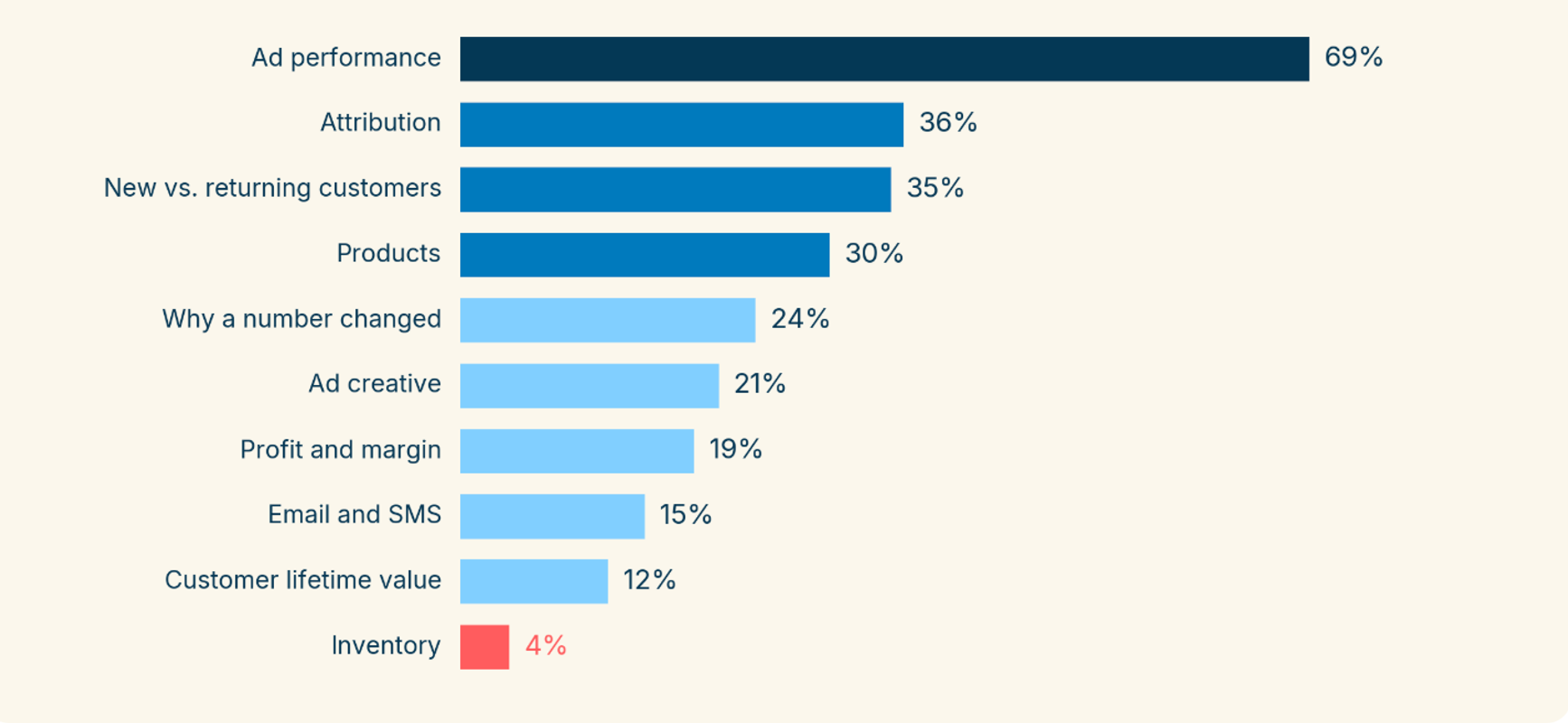
Here is what stands out in the numbers:
- Ads come first by a wide margin. Ad performance draws almost twice as many brands as the next topic, attribution (which ads and channels get credit for a sale).
- Brands focus on finding customers more than keeping them. 35% asked about new versus returning customers. Only 12% asked about customer lifetime value (how much a customer spends over time).
- Many brands want the reason behind a number. About 1 in 4 asked why a number changed.
- Profit gets far less attention than ads. 19% asked about profit and margin, and ad results alone don't show what you keep.
- Inventory is last. Only 70 of 1,642 brands asked about it, or about 1 in 25. The data can't tell us why.
How brands word their questions
Most brands asked for a specific number. Here’s how many brands asked about each one:
- Revenue or sales: 63%
- Ad spend: 57%
- ROAS, or how much you earn for each ad dollar: 48%
- CPA or CAC, or what it costs to win one customer: 31%
- Average order value, or what a customer spends per order: 24%
- Conversion rate, or how many visitors buy: 23%
Brands also name the channel they mean. Meta or Facebook came up for 49% of brands, Google for 36%, TikTok for 16%, and Klaviyo for 11%.
Many brands added three details that make a question easier to answer:
- A comparison, like "compare," "vs," or "last year": 42% of brands
- A time frame, like "last 7 days," "yesterday," or "this month": 36% of brands
- A breakdown, like by channel, campaign, ad, product, or day: 35% of brands
Wrapping up
AI can turn your store data into useful insights with the right prompt. Getting that data ready still takes time. You have to export reports, then clean and organize them before every analysis.
For ecommerce brands that want to move faster, Moby AI handles that step for you. It works from your connected Triple Whale data and gives answers in plain language, with no manual prep.
Ready to put your data to work? Get started with Moby AI today.
Ecommerce prompts: FAQs
What are ecommerce prompts?
Ecommerce prompts are the questions and instructions you give an AI tool to help with tasks related to running an online store, such as writing copy or figuring out why a number changed. The best prompts spell out the task, the data, the format, and any rules.
What are the best ChatGPT prompts for ecommerce?
The best ChatGPT prompts for ecommerce are specific. They tell ChatGPT who to be, what data to use, what time frame to look at, and what you want back. Good places to start are product descriptions, emails, support replies, margin checks, inventory planning, and customer segments.
What is an ecommerce LLM?
An ecommerce LLM is a large language model used for store work. It could be a general tool like ChatGPT or Claude, or one that’s connected to your store data. Moby AI is Triple Whale’s AI for ecommerce data, built to answer questions about your own numbers.
Can an LLM do ecommerce data analysis?
Yes, as long as your data is clean and clearly labeled. It can spot patterns, rank products, and compare time periods. It can’t verify your data or guarantee a forecast, so check the math and keep the final call with your team.